Fund a practice session
Open CKY → Wallet & Balance, or Dashboard → Wallet. Use the existing virtual top-up and withdrawal controls for the selected chain. These adjust simulated capital; they are not deposits or withdrawals on-chain. Read reset confirmations carefully: a reset is not a synchronisation repair.
Wallet is not position value
BUY consumes virtual capital and records position units. Rebuy increases exposure; SELL credits the simulated proceeds. Holding values what remains. Bought and Sold summarise recorded operations. An open position and available balance must be considered separately.
Read PNL
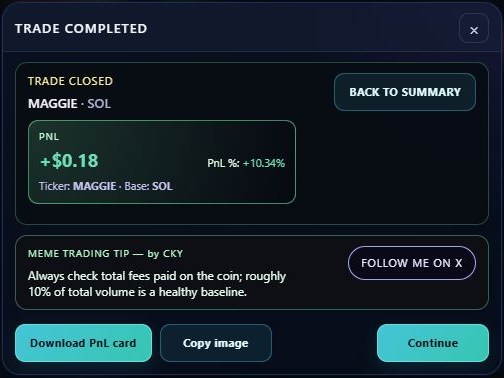
Realised PNL comes from sold portions. Unrealised PNL changes with the available current valuation of what remains. Average entry reflects accumulated buys. PNL percentages and currency values must be read with the operation size, fees and base-currency context.
Data that is absent or stale is not a reliable live quote. A feed card disappearing does not close the position or guarantee a fresh background valuation.
Use the Dashboard
Overview, Trades, Calendar and Performance organise recorded activity. Demons collects behavioural reviews; Wallet keeps virtual balance records. Look for the same token contract and trade session when reconciling a panel with history. Existing Challenge availability depends on the account.
Export a paper result
From the post-trade completion screen, use Download PnL Card or Copy image. Copy depends on browser clipboard permissions; a download fallback is available. Keep the simulation label visible and inspect the image for personal details before sharing.