
Prepare the entry
- Open a token on a supported platform and verify its full contract address and chain.
- Open the CKY Paper Trading panel and confirm your simulated balance.
- Check that MCAP is available and belongs to this coin.
- Choose a small amount you can track through the exercise.
For a first test, prefer an actively traded token with readable market data. Do not use the site’s real trading panel for this exercise.
BUY and rebuy
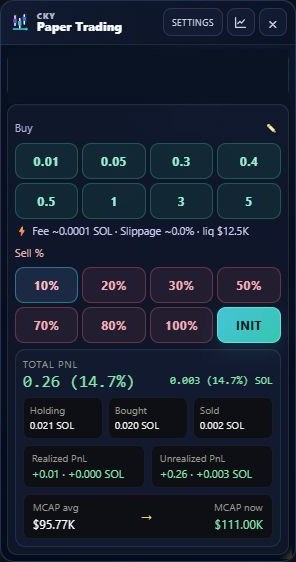
Click a CKY BUY preset once. Confirm Bought, Holding and average entry in the panel. A further BUY on the same active token adds to that paper position and recalculates the average. A rebuy after a full close starts a new trading session; do not assume a historical close is an active position.
Partial SELL and INIT
SELL 10%, for example, sells that share of the remaining paper position. Successive partial sells operate on what remains, not repeatedly on the original quantity. Realised PNL and remaining exposure change accordingly.
INIT recovers the capital still at risk and leaves the profit portion in the active position. It only acts when the remaining position is worth enough to recover that capital after the simulated costs. At or below breakeven, or without enough value after costs, it does nothing; use a normal SELL if that is your intended action. INIT does not close the trade.
Close and review
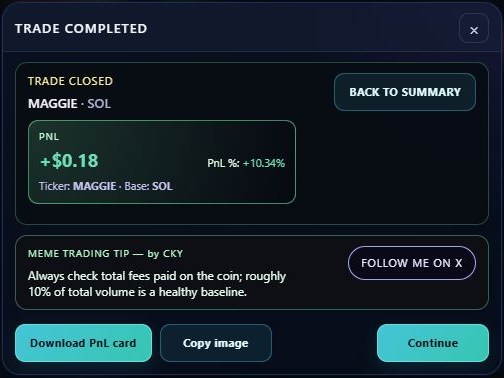
SELL 100% closes the remaining position. Review the trade summary, then the completion screen with PNL card download/copy actions. Continue opens Demon Finder for an optional behavioural review. The close has already happened before you choose a demon.
Return to a position
Navigate away and reopen the same token. CKY uses its recorded trade identity to recover an active position. Check Dashboard → Trades if the panel appears empty. A token’s pool or page URL can change during migration while the contract stays the same.
Cloud synchronisation supports recorded trade continuity across supported platforms and devices for the same account. Keep the account and chain consistent. Browser closure preserves recorded positions; it does not promise continuously running monitoring or automatic exits while the browser is shut.